

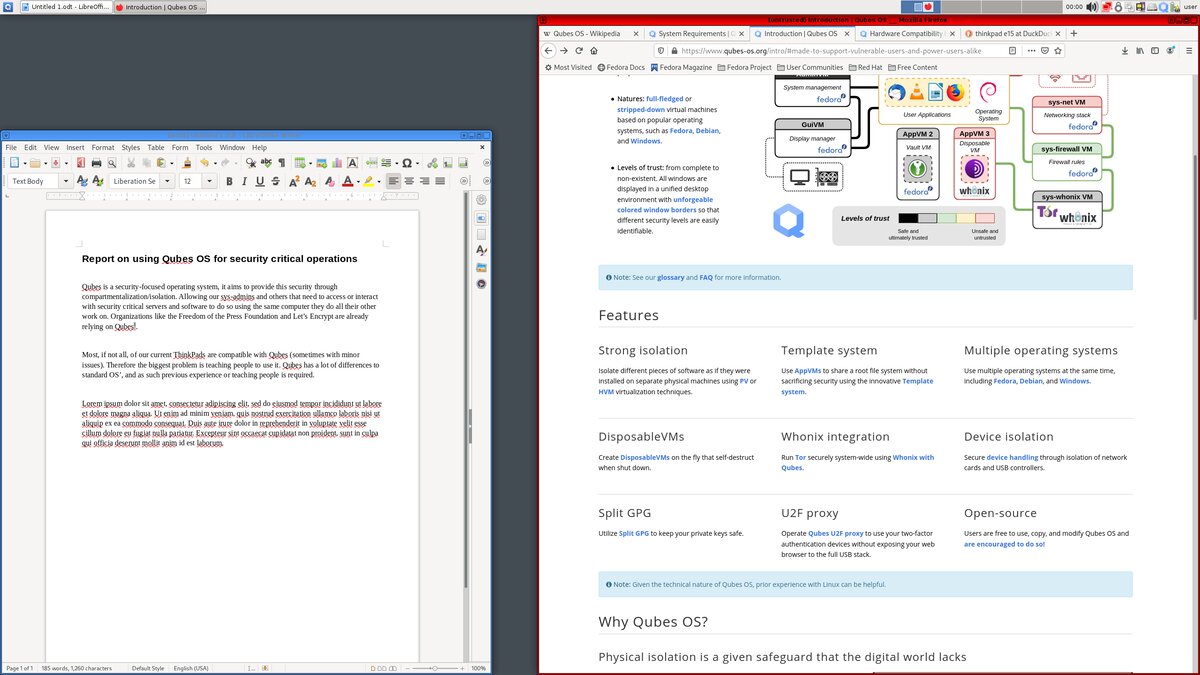
Qubes OS is an open-source desktop system that separates activities into compartments called “qubes”. Built on the Xen hypervisor, it can isolate work, personal browsing and untrusted documents from one another. The aim is to limit the consequences of a compromise, not to promise absolute security.
French profile published and information checked on .
Who is Qubes OS for?
Qubes suits people who need to separate activities with different trust levels and are willing to learn how to manage those boundaries. Window colours help identify compartments. Disposable qubes serve temporary tasks, while moving files between environments remains a decision requiring care. The official introduction explains the model.
For a first Linux computer mainly used for office work, this approach can require more learning than a conventional desktop. Our selection guide helps compare requirements. Qubes does not replace backups, updates or caution when handling received documents and messages.
Why is it not listed as a Fedora derivative?
Qubes combines Xen, virtual-machine management infrastructure and an integrated interface. Fedora and Debian templates supply software environments to qubes, but do not define the entire system architecture. The project FAQ explains this distinction. We therefore list it under Other operating systems rather than a Linux-derivative family.
Software: distinguish templates from workspaces
In the usual arrangement, applications are installed in a template and used from dependent qubes, which retain their personal data separately. Software installed in the wrong place may disappear after restarting. Read the template documentation before copying a command intended for Fedora or Debian; ordinary application-installation commands are not intended for the dom0 administration domain.
Hardware is a decisive requirement
Processor virtualisation and device isolation must be supported. Begin with the official requirements and hardware compatibility list. Having enough memory alone does not guarantee that Wi-Fi, suspend or other peripherals will work.
Prepare to download and install Qubes OS: image selection, memory, storage, virtualisation and signature verification.
Available release and maintenance
The stable release offered when this profile was checked was Qubes OS 4.3.2, released on 2 October 2026. The image incorporates fixes for the 4.3 branch; an already updated 4.3 installation does not need reinstalling merely for this image refresh. Templates also have their own support lifecycles. Check the release notes and supported-release information before upgrading.
Images: the Qubes OS project logo converted to JPEG and adapted sharing cards under CC BY-SA 4.0; see the logo source and licence. The historical official Qubes OS 4.0 screenshot illustrates the interface, not the current release or a test carried out by distrib.wiki.