

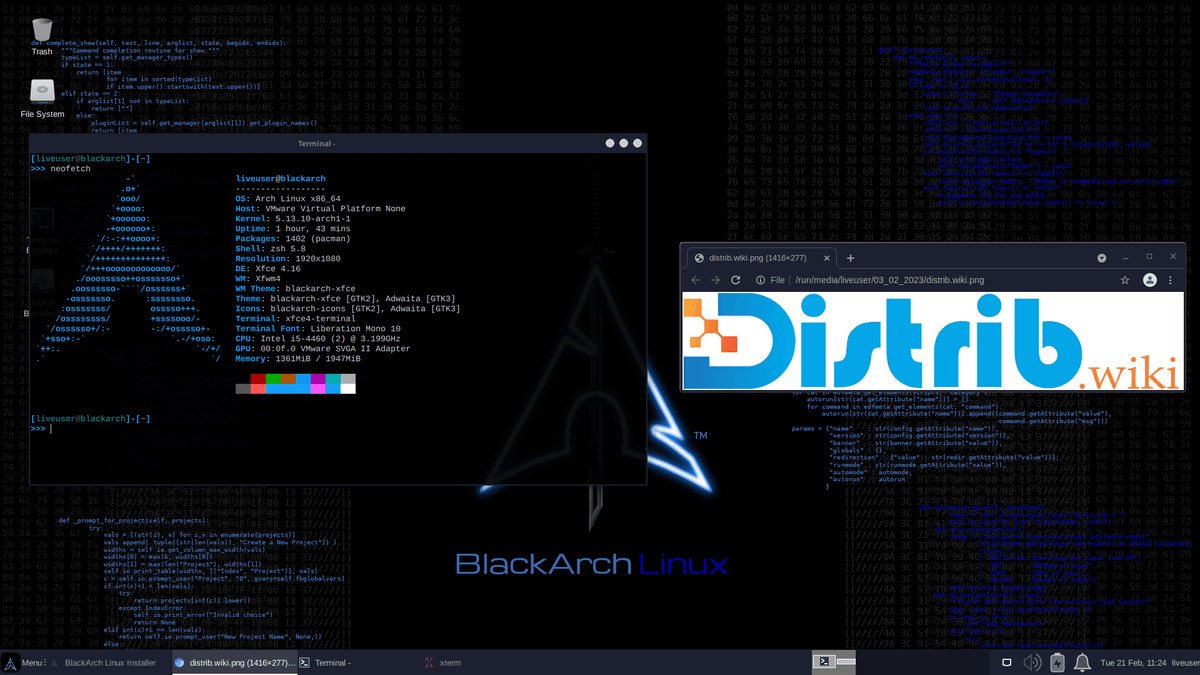
Opens the download page on distrib.wiki.
English edition published on .
BlackArch Linux: a distribution for penetration testing
BlackArch is a free, open-source distribution based on Arch Linux. It is designed for penetration testing, security auditing, cybersecurity research, network analysis, digital forensics, reverse engineering, OSINT, exploit research, web analysis and laboratory work. Its primary audience is penetration testers, security researchers, cybersecurity students and experienced users who need specialised tools.
Its extensive software repository is a defining feature. The original catalogue description recorded 2,863 security tools on the official website; this total changes over time. Tools can be installed individually or in groups, allowing users to build a focused environment rather than installing the entire collection.
There are two main ways to use BlackArch: install from a BlackArch ISO or add its repositories to an existing Arch Linux installation. The latter lets experienced Arch users retain their configured system while adding the security tools they need.
History of BlackArch Linux
BlackArch appeared in the early 2010s as a project supplying cybersecurity tools for Arch Linux. It aimed to provide a penetration-testing environment comparable in purpose to Kali Linux or Parrot OS while using Arch’s philosophy and package-management tools.
The project grew from a specialised repository into a complete distribution. Users could first add the repositories to an existing Arch system; later ISO images allowed direct installation of a prepared BlackArch environment.
Its tool collection expanded to cover reconnaissance, exploitation, fuzzing, forensics, network analysis, web auditing, cryptography, reverse engineering, malware analysis, wireless networks, social engineering, scanners, sniffers, defensive tools and infrastructure testing.
BlackArch follows Arch Linux’s rolling-release model. It does not use fixed major releases like Ubuntu LTS or Debian Stable. Packages and tools are updated through pacman, while ISO images mainly provide installation snapshots.
Advantages of BlackArch Linux
The large cybersecurity repository is its principal attraction. The original profile referred to more than 2,800 tools listed by the project, spanning penetration testing, auditing, network analysis, forensics, OSINT and security research. Check the project’s current catalogue for actual availability.
The Arch base provides pacman, rolling updates, extensive Arch documentation and considerable customisation freedom. People already comfortable with Arch can integrate BlackArch into a familiar environment.
Individual and grouped package installation avoids the need to install every tool. A web penetration tester can select web-application tools, while a forensic analyst can concentrate on digital investigation software.
The repositories can also be added to an existing Arch installation. This is useful for users who have already configured Arch and want security tools without reinstalling their system.
BlackArch is particularly useful in advanced cybersecurity laboratories. It supports recent tools and specialised, flexible environments built around the Arch ecosystem.
Limitations of BlackArch Linux
Its complexity is the main limitation. BlackArch is not intended for complete beginners. It requires Linux knowledge, familiarity with Arch, confidence in the terminal and the ability to resolve update, dependency and configuration issues.
It is also unnecessarily specialised for ordinary web browsing, office work, video playback or a family computer. Ubuntu, Linux Mint, Fedora, Debian or Zorin OS will generally provide a simpler everyday environment.
Rolling updates require regular maintenance. Users should apply updates correctly, follow important announcements and avoid leaving long gaps between updates. A supported LTS distribution may better suit an environment requiring fewer changes.
The Full image is very large because it includes the tools available when it was built. It may serve offline work or a comprehensive laboratory, but is excessive for many users. Slim or adding the repository to Arch may be more practical.
The security tools should be used only for lawful, authorised work. Testing a network, application or computer without explicit permission may be unlawful. BlackArch supports education, research and authorised audits; it does not confer permission to target other systems.
BlackArch Linux editions
The Full ISO contains a working BlackArch system and the complete tool collection available at image-build time. This is the largest option, primarily useful when tools must be available offline or for a comprehensive laboratory.
The Slim ISO is smaller and more suitable for many users. The project’s official GitHub repository describes Xfce4 and LightDM as its defaults. Users can start with a graphical environment and install additional tools as needed.
The Netinstall ISO is the smallest installation image. It retrieves required components over the internet and suits users who want to select precisely what is installed without downloading the large Full image.
BlackArch is also available as an added repository for Arch Linux. Existing Arch users can install its tools individually or by category through pacman while keeping their current installation.
For an initial exploration, Slim is often a useful compromise. On a configured Arch machine, adding the repository can avoid a redundant installation. Full is mainly appropriate for offline use or specialised laboratories.
Overall assessment
BlackArch is a specialised cybersecurity distribution with access to thousands of penetration-testing, auditing, forensic, OSINT and security-research tools. Its Arch base particularly suits experienced users, security researchers, penetration testers and students with sufficient Linux knowledge.
It is not an ideal choice for complete beginners or ordinary office use. Its extensive tooling brings administration complexity and a need for authorised, responsible use. For laboratory work or approved professional assessments, it offers an alternative to Kali Linux and Parrot OS.